
VoiceNotify API
API Documentation
Endpoint
POST https://api-v1.delight.fit/voicenotify
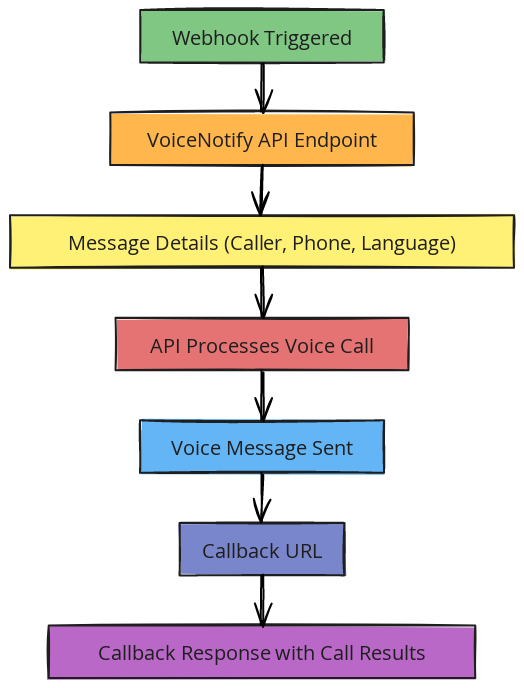
This endpoint allows you to automatically trigger outbound AI voice calls.
Headers
-
Content-Type: application/x-www-form-urlencoded
This tells the system how the data is being sent.
Request Body
Example request:
curl --location 'https://api-v1.delight.fit/voicenotify' \
--header 'Content-Type: application/x-www-form-urlencoded' \
--data-urlencode 'access_token=YOUR_ACCESS_TOKEN' \
--data-urlencode 'rows=[{...}]'
Field Explanations
-
access_token
Your private authentication key. This verifies that the request is coming from your system. Keep this secure. -
rows
An array of call requests. You can send multiple calls in one request. -
message
The voice message that the AI will speak during the call. -
caller
The phone number that will appear as the caller ID. -
phone
The recipient’s phone number (the person being called). -
language
Language used for the voice call (e.g., "ja" for Japanese, "en" for English). -
UTC
Time zone reference for scheduling and processing the call. -
callback_token
A custom identifier you define to match call results with your internal records. -
callback_url
The URL where call results will be sent after the call is completed.
Response
{
    "success": "1",
    "date": "Tue, 21 Jan 2025 09:11:55 GMT",
    "result": {
        "count": "2",
        "success_count": "2",
        "errors_count": "0",
        "message": "Call results are posted to the callback URL you provided after the call is completed."
    }
}
Response Field Explanation
- success – Whether the request was accepted (1 = successful).
- count – Total number of calls requested.
- success_count – Number of calls successfully processed.
- errors_count – Number of failed calls.
- message – General system message about the request.
Callback URL Response
After each call completes, the system sends the results to your callback URL.
Query Strings
- callee – The phone number that received the call.
- caller – The caller ID used for the call.
- call_result_code – Technical status code of the call result.
Example Callback Response
{
    "callee": "8190390456xx",
    "caller": "8150505008xx",
    "call_result_code": ""
}
Call Result Codes
After each call is completed, the system returns a call_result_code. This code tells you what happened during the call and can be used for reporting, retry logic, or automation workflows.
| Code | Result | Campaign Type | Description |
|---|---|---|---|
| 200 | The call answered | Automated & Agent | The callee answered the call successfully. |
| 1 | Voicemail detected | Automated & Agent | The call was redirected to voicemail. In agent campaigns, voicemail detection must be enabled to classify it correctly. |
| 2 | Initiated by the callee | Automated & Agent | The callee ended the call. In agent campaigns, this may occur while waiting in queue. |
| 3 | End of the scenario | Automated | The automated call completed normally according to the predefined scenario flow. |
| 486 | The number is busy | Automated & Agent | The callee was already on another call or line was busy. |
| 408, 487, 500 | The callee didn’t answer | Automated & Agent | The call was not answered (no response or phone switched off). |
| 603 | The call declined | Automated & Agent | The callee rejected or declined the call. |
| 404 | Invalid number | Automated & Agent | The destination phone number is incorrect or does not exist. |
| 480 | The callee is unavailable | Automated & Agent | The phone is switched off or outside network coverage. |
| 403 | Call not allowed | Automated & Agent | The number is in a Do Not Call (DNC) list or dialing is restricted. |
| 0 | No call performed | Automated & AgentThese codes help your system understand whether the call was answered, rejected, or failed. You can use this data for reporting, retry logic, or workflow automation.
|
VoiceNotify API
Sale price$20